Family profiles
A profile for everyone
you look after.
In AlongWell one person, the carer, holds the account and adds everyone they look after: parents, a partner, children, even a pet. Each profile keeps that person’s medicines, home readings and allergies. Home shows the whole family’s day, and a tap on someone’s name narrows it to theirs.


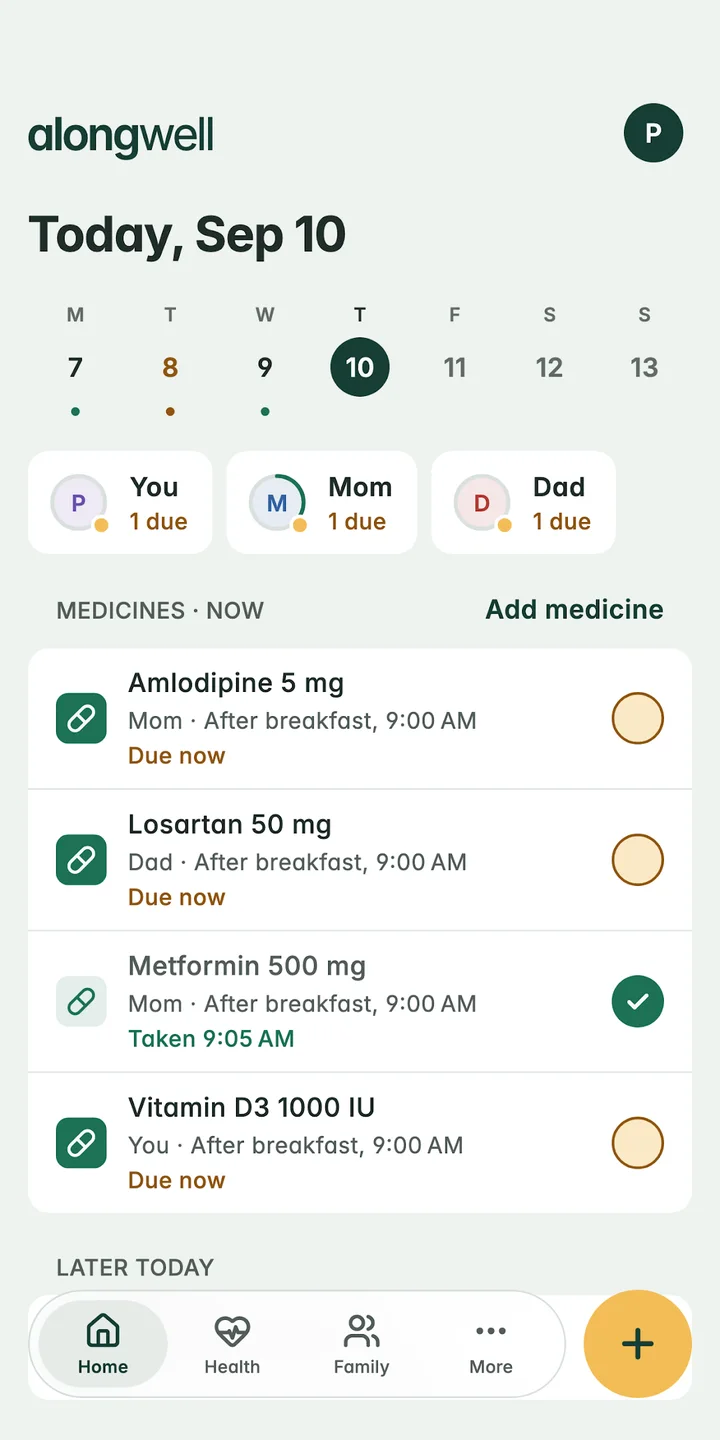
Amlodipine 5 mg · after breakfast, 9:00 am
How to set it up
Three steps.
Add a family member
Choose Person or Pet, then add a name, the name you use in reminders (Mum, Dad, Amma) and their date of birth.
Add what they take
Add their medicines, readings and any allergies. Each lives on their own profile.
See the day
Home lists everyone’s doses together. Tap a person to see only theirs.
Who can you add?
Anyone you look after: a parent, a partner, a child, a grandparent, and pets too. Each person gets the name you call them in reminders, so a notification says “A little reminder for Mum”, not her full name. Profiles can carry a photo, which only people on this account see.
What does each profile keep?
Everything about one person stays with them:
- Their medicines, schedules and every dose marked
- Home readings: blood pressure, blood sugar, pulse, oxygen, weight and temperature
- Allergies to medicines, foods or anything else, with the reaction if you know it
- Their WhatsApp number, if they get reminders there
The whole family’s day
Home shows today’s doses for everyone, grouped by now and later. Each person has a chip with a ring that fills as their doses are taken, so you can see at a glance who still has something due.
Pausing and removing
Pausing a profile stops that person’s reminders and keeps everything else as it is; resume when you’re ready. Removing someone takes them off the family and stops their reminders at once.
One account, one carer
Today one person holds the account and sees everything. Family members don’t sign in. They can get their own reminders on WhatsApp instead, and their replies show in your app.
Questions
Can I manage my parents’ medicines from another city?
Yes. Keep their medicines in AlongWell on your phone and connect their WhatsApp numbers. Each dose reaches them as a WhatsApp message, their replies show in your app, and you get a note if a dose isn’t marked.
Can I add a pet to AlongWell?
Yes. Add a pet as a family member and keep its medicines and reminders alongside everyone else’s. Pets can have readings such as weight and temperature.
Can two people share one family in AlongWell?
Not today. One person holds the account and sees the whole family. Family members can get their own reminders on WhatsApp without an account.
Can I keep a list of allergies for each family member?
Yes. Each profile has an allergies list for medicines, foods or anything else, with the reaction if you know it.
Let’s take care, together
A little less to carry.
Be here from the start.
AlongWell is free on the App Store and Google Play.