Effective 7 October 2026
Text messages from AlongWell
AlongWell sends one kind of text message: the code you ask for when you sign in. This page says who sends it, how you ask for it, what it says, what it costs, and how to stop it.
Who sends them
PrimeRole, Inc., which makes AlongWell, sends them as AlongWell from +1 (628) 296-1730. Questions about them go to hello@alongwell.app.
How you ask for a code
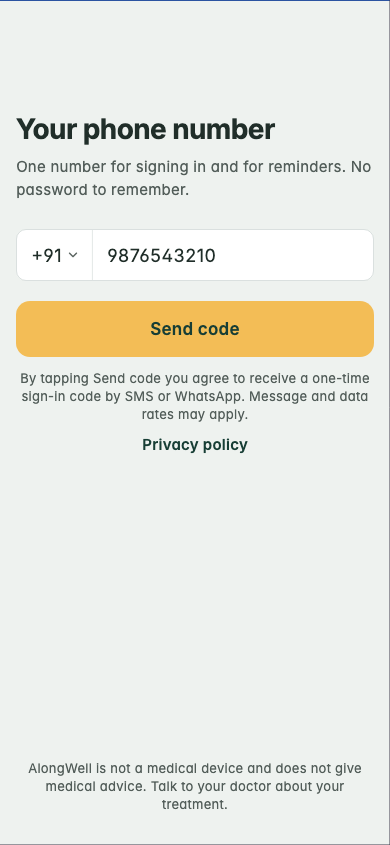
- Open AlongWell. The sign-in screen is titled Your phone number.
- Enter your mobile number.
- Tap Send code.
One code goes to that number. In the United States and Canada it comes by SMS. Elsewhere it comes on WhatsApp, and the SMS button under the code boxes sends it by SMS instead. Nothing is sent until you tap Send code, and each tap sends one message. Under the button, the screen says that tapping it sends a one-time code by SMS or WhatsApp and that message and data rates may apply, and it links to the privacy policy. There is no sign-up form and no list to join.
What a message says
A code arrives as one message:
123456 is your AlongWell sign-in code. It expires in 10 minutes. Do not share it. Reply STOP to opt out.
If you change the number on your account, your old number gets one message saying so, so that you know if someone else did it:
The phone number on your AlongWell account was changed. If this was not you, write to hello@alongwell.app.
Nothing else is sent by SMS. Medicine reminders come as notifications on your phone or on WhatsApp, and AlongWell sends no marketing texts.
How often, and what it costs
One message for each code you ask for, and one if you change your number. The app stays signed in, so you ask for a code when you sign in on a phone, not every day. Message and data rates may apply. Your carrier charges them, and AlongWell does not.
Stopping them
Reply STOP to +1 (628) 296-1730 and that number stops texting you. You can still sign in with a code on WhatsApp. Reply START to allow texts again, and HELP for help.
Your number
We do not share, sell or provide your mobile phone number, or your consent to receive text messages, to third parties or affiliates for marketing or promotional purposes. Twilio delivers the messages for us and receives the number for that alone. The privacy policy says what else happens to your number, and the terms of use cover the rest.